
Flow Wrappers — The Complete B2B Guide
25+ articles on selection, operation, maintenance and troubleshooting for packaging engineers.
Key Takeaways
Quick answer: Servo motor troubleshooting covers drive faults, feedback faults and mechanical loading — read the drive diagnostic first, then isolate electrical vs mechanical causes.
- Know the architecture — drive, motor, encoder and load interact
- Common fault modes repeat — overcurrent, overposition, feedback loss
- Electrical or mechanical? — isolate by testing motor disconnected from load
- Replace vs repair is economic — age, cost and downtime decide
- Prevention is environmental — clean cabinets and proper grounding prevent most drive faults
Introduction
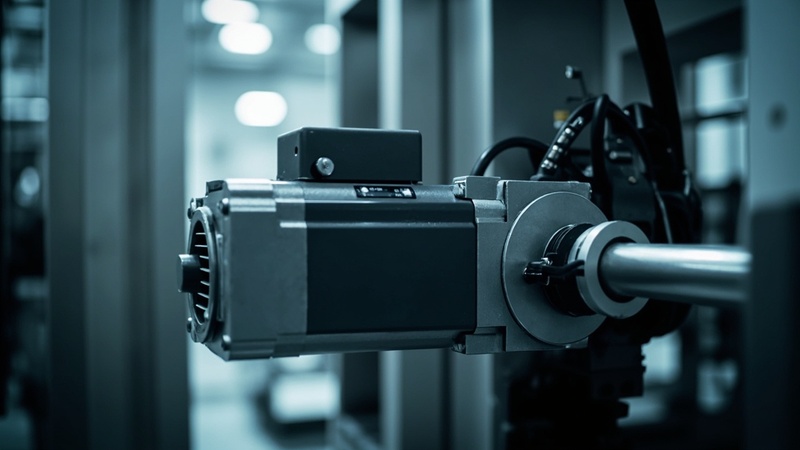
Servo motors are the muscle behind every precise motion in a horizontal flow wrapping machine — from film unwinding and product feeding to cross-sealing and cutting. When a servo drive faults out, the entire packaging line stops. In our field service work on flow wrapping lines, servo-related issues are a regular cause of unplanned downtime events.
Unlike simple induction motors, servo systems are closed-loop feedback devices that constantly adjust to maintain position, speed, and torque accuracy. This complexity means that faults can originate from the motor itself, the drive (amplifier), the feedback encoder, the mechanical coupling, or the PLC command signal. Diagnosing which component is at fault — and why — requires a methodical approach.
This article provides a practical, step-by-step guide to servo motor troubleshooting in horizontal flow wrappers, covering the most common fault modes, their root causes, and proven solutions.
Key Takeaway: Most servo faults trace back to mechanical overload, encoder problems, or communication errors rather than motor failure. Replacing a motor without diagnosing the root cause often leads to repeated failures and unnecessary expense.
What Is Servo System Architecture and Why Does It Matter?
The servo concepts above apply to packaging equipment across our range, including the JC700 four side seal sachet machine.
Key Components
| Component | Role in Flow Wrapper | Common Brands |
|---|---|---|
| Servo Motor | Provides precise rotary motion for film feed, sealing, cutting | Siemens 1FL6, Lenze MCS, Delta ASDA |
| Servo Drive | Amplifies command signals and regulates power to the motor | Siemens V90, Lenze NANO, Delta A2 |
| Encoder (Feedback) | Reports rotor position back to the drive for closed-loop control | Absolute or incremental, resolver |
| Mechanical Coupling | Connects motor shaft to the driven mechanism | Bellows couplings, timing belt pulleys |
| PLC Command | Sends position, speed, or torque references to the drive | Via Profinet, EtherCAT, analog |
Where Servos Are Used in Flow Wrappers
A typical high-speed horizontal flow wrapper uses 3–6 servo axes:
| Axis | Function | Typical Requirements |
|---|---|---|
| Film Feed | Pulls packaging film at synchronized speed | High accuracy, variable speed |
| Infeed Conveyor | Feeds products at consistent spacing | Torque control, precise timing |
| Cross-Seal | Actuates end-seal jaws up and down | High force, repeatable positioning |
| Knife Cut | Drives rotary or reciprocating knife | Precise angular positioning |
| Longitudinal Seal | Controls longitudinal sealing wheel pressure | Torque regulation |
| Discharge | Transfers finished packages to downstream equipment | Speed matching |
How Do You Handle Most Common Servo Fault Modes?
Fault 1: Overload / Overcurrent (Fault Code: Typically F07xxx or similar)
This is the single most common servo fault we encounter in the field.
Symptoms:
– Drive displays “Overload” or “Overcurrent” fault
– Motor stalls during machine start-up or under load
– Drive trips after running for several minutes at production speed
– Machine was running fine yesterday but faults today
Diagnostic Procedure:
- Check the mechanical load
- Disconnect the motor coupling from the driven mechanism
- Run the motor with no load — does the fault still occur?
- If the fault disappears, the problem is mechanical (binding, misalignment, lubrication failure)
- Measure actual current draw
- Use a clamp meter on the drive’s power input
- Compare actual current to the motor’s rated current on the nameplate
- Current exceeding 150% of rated for more than 5 seconds typically triggers overload
- Inspect the mechanical coupling
- Check for misalignment between motor and driven shaft
- Verify the coupling is not damaged or binding
- Look for signs of excessive wear or contamination
- Review machine parameters
- Has product weight or size changed? Heavier products increase sealing force requirements
- Has the production speed increased? Higher speeds demand more torque during acceleration
- Check if the correct motor sizing is being used for the current application
Root Causes and Solutions:
| Cause | Solution |
|---|---|
| Mechanical binding in sealing mechanism | Clean and lubricate cam followers, check bearing condition |
| Misaligned coupling | Realign using dial indicators or laser alignment tool |
| Increased product size or weight | Recalculate torque requirements; adjust acceleration/deceleration ramps |
| Worn bearings in driven mechanism | Replace bearings in the affected assembly |
| Drive current limit set too low | Adjust drive parameters — but only after verifying mechanical load is within spec |
Fault 2: Following Error / Position Deviation
Following errors occur when the motor cannot reach or maintain the commanded position within the allowed tolerance.
Symptoms:
– Drive reports “Following Error” or “Position Deviation”
– Sealing or cutting timing drifts out of sync
– Packages show inconsistent seal positions or cut lengths
– Machine runs at low speed but faults at high speed
Diagnostic Procedure:
Related: Common Flow Wrapper Problems and Solutions:
- Check encoder feedback
- Verify the encoder cable is intact and properly connected
- Look for intermittent connections — wiggle the cable while monitoring the feedback signal
- For absolute encoders, check battery voltage (dead batteries cause position loss on power cycle)
- Examine mechanical backlash
- Check timing belt tension (if belt-driven)
- Inspect gear reducers for excessive backlash
- Verify coupling integrity — loose couplings introduce positional lag
- Review drive tuning parameters
- Gain settings that are too low result in sluggish response and following errors
- Gain settings that are too high cause oscillation and instability
- Verify that tuning has not been inadvertently changed
- Test at reduced speed
- Run the machine at 50% speed
- If the following error disappears at lower speed, the issue is likely acceleration-related (insufficient torque or excessive load inertia)
Root Causes and Solutions:
Related: Troubleshooting Heat Sealing Issues: Seal Strength
| Cause | Solution |
|---|---|
| Loose encoder connection | Reseat connectors; replace encoder cable if damaged |
| Mechanical backlash | Tighten belts, replace worn gears, secure couplings |
| Drive tuning drift | Re-tune the servo using auto-tune function, then fine-tune manually |
| Excessive load inertia | Increase acceleration time; consider larger motor if permanently changed |
| Encoder damage | Replace encoder — note that many modern motors have integrated encoders requiring motor replacement |
Fault 3: Overheating
Servo motors and drives operating at elevated temperatures degrade faster and eventually fail if the root cause is not addressed.
Related: Film Wrinkling: Causes, Prevention, and Correction
Symptoms:
– Motor or drive housing feels hot to the touch (above 70°C / 158°F)
– Drive shows thermal fault after extended operation
– Motor insulation degradation detected via megger test
– Reduced motor performance or intermittent faults
Diagnostic Procedure:
- Measure actual temperature
- Use an infrared thermometer to measure motor and drive surface temperatures
- Compare against manufacturer specifications (typical motor rated temperature: 100–130°C winding, 60–80°C housing)
- Measure ambient temperature inside the control cabinet
- Check cooling systems
- Verify cooling fans on the drive are operating and not blocked
- Check cabinet ventilation filters — clean if clogged
- For forced-air cooled motors, confirm the air supply path is clear
- Review duty cycle
- Is the machine operating continuously at or near peak load?
- Are acceleration/deceleration cycles too frequent?
- Calculate the RMS current demand over one production cycle
- Inspect for electrical issues
- Measure supply voltage — undervoltage increases current draw and heat generation
- Check for voltage imbalance between phases (>2% imbalance indicates supply issues)
- Verify the drive carrier frequency setting — higher frequencies increase drive switching losses and heat
Root Causes and Solutions:
| Cause | Solution |
|---|---|
| Blocked cabinet ventilation | Clean or replace air filters; ensure cabinet fans are functional |
| Ambinet temperature too high | Install cabinet air conditioning or improve ventilation |
| Continuous overload operation | Reduce production speed or upgrade to a larger motor/drive |
| Undervoltage supply | Check transformer and wiring; correct voltage issues |
| High carrier frequency setting | Reduce carrier frequency if audible noise permits (check motor compatibility) |
| Failing motor bearings | Replace bearings — bearing friction is a major heat source |
Fault 4: Vibration and Noise
Abnormal vibration or noise from a servo motor usually indicates a mechanical problem, though electrical issues can also be the culprit.
Symptoms:
– Audible whining, grinding, or knocking from the motor or driven mechanism
– Visible vibration on the motor housing or mounting structure
– Excessive vibration detected by the drive’s built-in monitoring
– Surface finish defects on sealed packages
Diagnostic Procedure:
- Isolate vibration source
- Run the motor uncoupled — if vibration persists, the motor itself has a problem
- If vibration disappears when uncoupled, the issue is in the driven mechanism or coupling
- Check motor bearings
- Use a stethoscope or vibration analyzer on the motor bearing housings
- High-frequency sounds indicate bearing damage
- Compare vibration levels to ISO 10816 standards
- Inspect coupling alignment
- Misaligned couplings cause vibration that increases with speed
- Check parallel and angular alignment with a dial indicator
- Verify drive output
- Excessive vibration can also result from drive output issues
- Check for missing motor phases (measure voltage between phases at the drive output)
- Review drive carrier frequency — frequencies below 2kHz can cause motor acoustic noise
Fault 5: Communication Loss Between Drive and PLC
Modern servo systems communicate with the PLC via industrial Ethernet (Profinet, EtherCAT, Powerlink) or fieldbus networks.
Symptoms:
– Drive shows “Communication Fault” or “Bus Error”
– Motor doesn’t respond to PLC commands
– Machine faults out randomly during production
– Multiple axes fault simultaneously (suggests a network issue, not individual drive problems)
Diagnostic Steps:
- Check network cable connections at both drive and switch
- Verify device name and IP configuration match the PLC project
- Test with a known-good cable
- Check for EMI interference near network cables
- Review the PLC diagnostic buffer for communication error details
How Should You Maintain Servo System Preventive?
A well-maintained servo system can operate reliably for 50,000+ hours. Here is a maintenance schedule based on manufacturer recommendations and our field experience:
Monthly
- Visual inspection of all servo motors and drives for damage, contamination, or loose connections
- Temperature check using infrared thermometer on motor housings and drive heatsinks
- Listen for unusual noises during machine operation at normal production speed
- Check mounting bolts for tightness — vibration can loosen fasteners over time
Quarterly
- Clean motor cooling fans and air vents — debris accumulation reduces cooling efficiency
- Inspect cable routing — ensure motor power and encoder cables are properly secured and not rubbing
- Verify drive parameter settings against the master parameter list (unauthorized changes are a common cause of intermittent issues)
- Test emergency stop response for all servo axes
- Check cable shields — verify shield grounding at both ends (motor and drive)
Annually
- Megger test motor insulation resistance (>1 MΩ at 500VDC is acceptable for most servo motors)
- Vibration analysis on all servo motor bearings — trending data over time reveals developing problems
- Replace encoder batteries in absolute encoder systems (typical life: 1–2 years)
- Thermographic survey of the drive cabinet to identify hot spots
- Review and update parameter backup files
When to Replace vs. Repair
| Situation | Recommendation |
|---|---|
| Motor bearing failure | Repair (bearing replacement) — cost-effective and common |
| Winding insulation failure | Replace motor — rewinding is rarely cost-effective for servo motors |
| Encoder failure | Depends on motor design — integrated encoders require motor replacement; modular encoders can be replaced separately |
| Drive power section failure | Repair if under warranty; replace if out of warranty and older than 5 years |
| Repeated faults after repair | Investigate root cause thoroughly — the system may be undersized or mechanically overloaded |
Frequently Asked Questions
How do I tell if the servo motor or the drive is the faulty component?
The most effective test is to swap the motor leads between a suspected faulty axis and a known-good axis. If the fault follows the motor, the motor is the problem. If the fault stays with the drive, the drive is at fault. This swap test should only be performed if both axes use identical motors and drives. At Path Pack, our machines are designed with standardized servo platforms to facilitate this kind of diagnostic testing.
Can I run a flow wrapper with one servo axis disabled?
In most cases, no. Flow wrappers require synchronized motion across all axes to maintain film registration, seal timing, and cut length accuracy. Running with a disabled axis will produce defective packages. Some machines have manual modes for specific axes during setup, but these are for commissioning only, not for production.
What causes a servo motor to overheat even when the mechanical load seems normal?
Common overlooked causes include: restricted airflow to the motor (clogged cooling fins or blocked vents), high ambient cabinet temperature, voltage imbalance in the three-phase supply (even a 2% imbalance significantly increases heating), and incorrect drive carrier frequency settings. Also check if the motor’s insulation class matches the application — a Class F motor in a high-duty-cycle application may simply be undersized.
How long should a servo motor last in a packaging environment?
With proper maintenance, a quality servo motor in a packaging environment should last 50,000 to 80,000 hours of operation (roughly 6–10 years of three-shift production). Key factors that reduce motor life include: contamination from product debris or moisture, excessive ambient temperatures, frequent overloads, and inadequate preventive maintenance. Motors from established manufacturers like Siemens and Lenze are designed for these demanding conditions.
Is it worth repairing a servo drive, or should I just replace it?
For drives under warranty, repair through the manufacturer is always recommended. For out-of-warranty drives, the decision depends on age and repair cost. As a general rule: if the drive is less than 5 years old and the repair cost is less than 50% of a new unit, repair is usually worthwhile. For drives older than 5 years, replacement is often more cost-effective because newer models offer better efficiency, diagnostics, and network compatibility. At Path Pack, we stock critical spare drives for all machines we supply to minimize downtime.
Conclusion
Servo motor troubleshooting in flow wrappers requires understanding the interplay between the motor, drive, encoder, mechanical coupling, and PLC. The most effective approach is systematic: start with the fault code, isolate the problem area (motor, drive, communication, or mechanics), and test methodically before replacing components.
The most important lesson from field service is this: never replace a servo component without identifying the root cause. A burned-out motor that was overloaded due to a seized bearing will simply burn out again if you replace the motor without fixing the bearing. Invest the time in proper diagnostics, and you will dramatically reduce both downtime and component costs.
Path Pack’s horizontal flow wrapping machines are built with servo systems matched to the application. Every machine ships with complete parameter documentation, spare parts lists, and access to our remote diagnostic support team. If you are experiencing chronic servo issues or evaluating new packaging equipment, contact Path Pack’s engineering team — we will help you find the right solution for your production requirements.
By Path Pack Technical Team
🛠️ Hands-on guide: For step-by-step instructions on your machine, see Servo Alarms — Advanced Diagnostics in the Path Pack Support Center.
Servo fault outside this guide’s scope? → Contact Path Pack support with the drive diagnostic code and machine model.

 English
  Spanish
  French
  German
  Korean
  Russian
  Italian
  Arabic